
Make Auto Express a ‘preferred source’: How to add us on Google
There’s a new way to make sure you don’t miss a thing in the wide world of cars

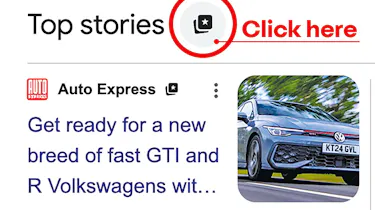
A new feature on Google allows you to choose your own ‘preferred sources’ for news and other content. These trusted brands will be prioritised in the Top Stories boxes you sometimes see while searching the internet with Google.
By selecting Auto Express as a preferred source you can make sure you keep right up to date with all the latest car news, reviews and features from the UK’s favourite car magazine and website.
The feature follows the arrival of the facility to follow media brands like Auto Express on Google Discover and continues the US giant’s focus on providing more personalised experiences on its platforms.
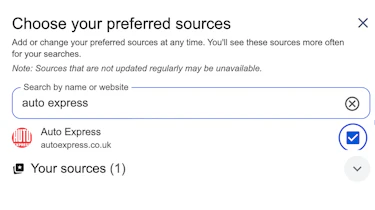
If you’d like to add Auto Express as a preferred source, just click this shortcut or do it by following the simple steps outlined below.
- Find a Google search page with a Top Stories box. You can do this by searching for any topic that’s in the news. A simple search for ‘car news’ will work.
- Click the icon to the right of the ‘Top Stories’ title at the top of the page.
- Type ‘Auto Express’ in the ‘Choose your preferred sources’ box that opens.
- Tick the box next to Autoexpress.co.uk and hey presto! Auto Express is now a preferred source.
- The next time you search for car-related information, you’ll have more chance of seeing our latest stories.
Follow Auto Express
Remember, there are all kinds of ways to make sure you stay right up to date with the latest from the Auto Express team of expert car journalists. Click the links below and you won’t miss anything that matters from the world of cars…
Social media
Now you can buy a car through our network of top dealers around the UK. Search for the latest deals…