Apple CarPlay: what is it, how does it work, and is it better than Android Auto?
With Apple CarPlay, you can safely use various iPhone features while driving. Here’s how it works
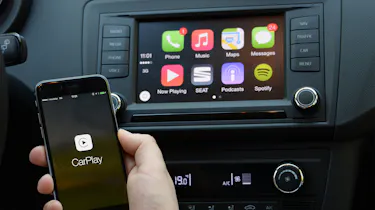
Apple CarPlay is an official screen mirroring system allowing drivers to pair their iPhones with a car’s infotainment system. It’s now commonly found as a standard feature on brand-new cars, while older models may have it as an optional extra or as part of an aftermarket infotainment system. CarPlay’s interface overrides the car’s regular infotainment software and makes it easy to operate an iPhone via the touchscreen, steering wheel controls and voice recognition system.
Apple CarPlay was first introduced in 2014 and has since evolved into one of the most useful features in modern cars in the eyes of many motorists, with most new cars having CarPlay fitted as standard.
So how does Apple CarPlay work and what are the benefits? Our handy guide explains everything you need to know.
What is Apple CarPlay?
By creating its own user interface for iPhones in cars, Apple’s CarPlay system aims to make using your iPhone’s features as safe and straightforward as possible when behind the wheel. Along with the ability to make phone calls, send messages and look up contacts, Apple CarPlay lets you access your music through Apple Music or third-party apps such as Spotify.

You can also use navigation apps such as Apple Maps, Waze or Google Maps. Not all apps are available, though, with only those being deemed safe to use while driving being accessible. This means video apps like YouTube are off limits, as well as games.
What is Apple CarPlay Ultra?
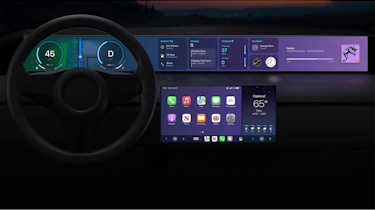
As the name suggests, Apple CarPlay Ultra takes the system’s functionality a step further within compatible cars. As well as mirroring many of your phone’s apps on the central touchscreen, Ultra also takes control of the digital driver’s display and provides a whole host of further functions.
Apple’s new custom dashboard cluster allows the driver to tailor their screen to their own personal tastes and requirements with custom dials and colour schemes. Full synchronisation between both the dash and central screen also helps to create a more seamless feel between the two displays.
The centre screen, meanwhile, also benefits from additional features including three new icons: radio, climate and home. CarPlay Ultra also comes with a new ‘Car’ app which allows you to change vehicle settings such as the drive mode and assistance functions.
What are the benefits of Apple CarPlay?
A key benefit of using Apple CarPlay is that it’s simple to connect your iPhone to your car. The interface is straightforward and easy to use on the move, and apps used within the system are connected to the internet and receive regular over-the-air updates. This is particularly beneficial when using navigation apps, as these are able to display up-to-date traffic information and even alter your route to avoid the resulting delays.
Most manufacturers provide their own infotainment systems which already feature smartphone connectivity. However, Apple CarPlay operates alongside the manufacturer’s operating software, and its regular over-the-air updates can quickly make any pre-installed technology look and feel outdated.
CarPlay’s display should feel very natural to iPhone users, as the menus and apps are laid out to closely replicate how they appear on the phone’s screen. Apple CarPlay’s functionality isn’t just limited to a car’s main infotainment screen, though, as a major update was introduced in 2023 which increased the functionality of Apple CarPlay to include all driver display screens. This new setup is only available in a few models so far, but those that can operate it benefit from dashboard readouts and customisable widgets which appear in front of the driver.
If you’re an Android phone user you won’t be able to use Apple CarPlay with your device, but Google’s Android Auto system will allow you to access many of the same functions. Asking which is better in the great CarPlay vs Android debate is a bit like choosing between BMW or Mercedes. They’re both great, just a bit different, and whichever phone system you prefer will determine whether Apple CarPlay or Android Auto is best for you.
How to connect Apple CarPlay
Using CarPlay is pretty effortless and you can connect your iPhone (or even iPad) to your car in an instant. CarPlay systems can either be connected via a car’s USB or USB-C socket or through a wireless connection, while some cars can support both. The connection process differs slightly depending on your chosen method:
Connecting CarPlay via USB:
- Plug one end of the USB or USB-C Lightning cable into your device and the other into the car’s built-in socket.
- In some car models, only one socket may be used for data connectivity, so be sure to double-check that you’re using the right one.
- Once connected, a pop-up message should appear on both the car and iPhone’s screens asking if you wish to connect. Simply tap ‘yes’ and CarPlay will start up.
Connecting CarPlay wirelessly:
- This procedure may vary depending on the car you are connecting to, but most models will require you to connect in one of two ways. If your car supports both wired and wireless connections, you may need to plug in your phone via the cable if you’re connecting it for the first time.
- After this, the car will recognise your phone and show a pop-up allowing you to connect wirelessly from then onwards.
- Alternatively, your car’s infotainment system may act as a wi-fi hotspot for you to connect to from day one.
When you connect to CarPlay, the car's infotainment screen will show a menu of the compatible apps on your iPhone. This includes pre-installed iPhone apps such as Phone, Music, Maps, Messaging, Audiobooks and Podcasts. Third-party apps such as WhatsApp or Spotify can also be accessed.
Using CarPlay is far easier and safer to do than trying to use your iPhone while driving, which of course is an offence that's punishable by a fine and points on your licence.
What are the latest Apple CarPlay apps and updates?
Music
Finally, there’s a progress bar that allows you to scrub through tracks to the point you want, rather than a far less usable skip function. Lovers of podcasts will particularly appreciate this feature, we suspect.
Configurable widgets
With iOS 26, Apple CarPlay now supports three configurable widgets (up from two). This allows users to pick which information is useful to them and make it easier to see at a glance. You can display apps like music, maps, or live sports updates simultaneously.
‘Liquid’ Glass’ art style
The new ‘Liquid Glass’ design changes the way the Apple CarPlay screen looks by introducing translucent elements. It has been somewhat controversial as not everyone likes it, but the design was introduced to give the display a more modern look and improve the ease of use.
Disable the pinned messages
iOS 26 lets you disable pinned messages, so the most up-to-date messages are displayed right at the top rather than being pushed below older pinned messages.
Car Key
Apple CarPlay iOS 17 allows you to unlock and even start some car models with your iPhone. This clever feature also allows you to lend contacts a virtual key, called Car Key, so you can grant friends and family access to your car even if you’re not there to physically hand anything over. The technology also prevents the car from locking if you’ve left your iPhone inside. There’s only a limited selection of compatible models, though. A wide range of BMW models built since 2021 work with the technology, but otherwise, it’s only a smattering of cars from Genesis, Kia, Hyundai and Mercedes.
Apple Maps
Apple installs the Map app as standard on all iPhone and iPad devices, and as it's fully CarPlay compatible, it means you can have sat-nav in your car for a fraction of the cost of factory-fitted nav systems. It displays turn-by-turn directions on your car’s infotainment screen, and offers the full range of location search and destination functions that a conventional nav system offers. In fact, some carmakers are already dropping the option of sat-nav on some CarPlay-equipped cars, and it's a real possibility that built-in sat-nav could become obsolete in the near future.
Apple Maps has received some updates, aside from the usual optimisation and performance tweaks. In addition to maps now displaying in 3D, the map display has more details – showing turning lanes, pedestrian crossings and bike lanes providing more detail for the driver. EV routing for plug-in hybrid and electric car drivers has also been updated, showing information on the number of available charging points at a location and plug types. Maps can also be downloaded and displayed in ‘Offline’ mode too, allowing drivers to continue their journey, even if the mobile data signal ever drops out.
With iOS 27, pinch-to-zoom functionality is now possible on compatible touchscreens.
Siri
Not all cars come with voice control, but iPhones are fitted with the Siri voice assistant as standard, and this adds user-friendly touches when used with CarPlay. It works in conjunction with messaging apps and can read out text messages over the car's speakers. What's more, you can dictate messages to Siri to send to contacts. The effectiveness of this depends on how refined your car is, because background noise can hamper Siri's ability to transcribe what you say.
Apple’s voice assistant Siri has also received some upgrades in the latest version. The previous update saw Siri read out your text messages automatically when you receive them, meaning you no longer had to distract yourself by interacting with the touchscreen to play them out loud, and could use the voice control buttons on your steering wheel if your car has that feature. The interface has been slimmed down slightly, reducing the amount of space taken up on the screen for improved multi-tasking, such as when used in conjunction with navigation apps.
The more capable Siri AI was added to CarPlay with iOS 27, but only for users of more recent iPhone models.
Which cars come with Apple CarPlay?
As time progresses, more and more car makers are embracing CarPlay technology. The first car to use Apple CarPlay was the Ferrari FF, which was revealed at the 2014 Geneva Motor Show. Other makers soon followed suit, and today Apple CarPlay is often bundled together with Android Auto in a car's infotainment package.
If you’re not in the market for a new car but would like to upgrade your car’s infotainment system, you can buy aftermarket navigation/audio head units that are pre-loaded with CarPlay – reputable manufacturers such as Alpine, Sony, JVC, Pioneer and Kenwood all offer a range of units.
Which cars come with Apple CarPlay Ultra?
For now, Aston Martin is the only brand to offer Apple CarPlay Ultra in its cars. The British brand can also retrofit the tech to some older models, too, although this comes at an extra cost.
Several other (and more affordable) brands including Ford, Kia, Hyundai, Genesis, Land Rover, Nissan and Porsche have also pledged to introduce the tech to their models in the near future. Some companies including Audi and Ford and Volvo had previously said they would adopt the technology, only to rule it out. Mercedes and Renault are among others to reject the setup
Apple CarPlay vs Android Auto: which is better?
The basic features of Apple CarPlay and Android Auto are broadly similar, but dedicated iPhone users will prefer the simple and refined CarPlay interface, which mimics the look and feel of an iPhone.

Android Auto uses the live update card information system used by Google Now.
Music features naturally reflect the systems’ origins too – so CarPlay uses Music (formerly iTunes) but also connects to Dash Radio, Stitcher and Audible, while Android Auto leads with Google Play Music, but also enables Spotify and Radioplayer.
Both rival systems handle navigation and mapping effectively, but many users will be instantly more comfortable with Android Auto’s Google Maps system, as it’s so familiar from their desktops.
In terms of functionality, the two systems are very similar, but CarPlay focuses on simple, clean, intuitive user journeys while Android Auto’s strength is a more open platform for third-party apps and content. Apple is continuing to open up CarPlay to be compatible with more third-party apps, though.
Did you know you can sell your car with Auto Express? Get the highest bid from our network of over 5,500 dealers and we'll do the rest. Click here to try Auto Express Sell My Car now...