
AA Route Planner: what it is and how to plan a journey
Planning a road trip? Here’s how to use the AA’s Route Planner

Go online today and there’s no shortage of navigation tools to choose from whenever you need directions. The AA Route Planner is a true veteran of the journey planning world, though, as it was first launched in 1999.
Today, the AA’s journey planning tool acts as an online alternative to navigation apps such as Google Maps or Waze. It provides straightforward directions, live traffic updates plus information on local points of interest, nearby parking and accommodation.
How to use the AA Route Planner
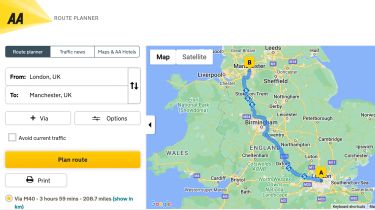
The full version of the AA Route Planner can be found via any web browser, and planning your route is done in the same basic way as with rivals like Google Maps. There are two boxes; one for entering your departure point and another for the destination. Simply enter the required locations in both and the planner will calculate your route.
Alternatively, if you allow the website to track your live location via GPS, the planner will allow you to set your exact location as your departure point.
If you wish to make a stop (or several) along your planned route, you can add additional locations as waypoints by using the ‘via’ button. You can add as many additional stops as you wish.
If you’d prefer to avoid toll roads and motorways, there are also options that will allow you to do this. However, in some cases this may not be possible without adding a considerable amount of extra miles to your journey. Thanks to the AA Journey Planner’s live-traffic monitoring, you can also choose to avoid current traffic jams (if possible).
Once your route has been calculated, you will see an image of it on the map alongside a number of written instructions. If you prefer your directions on good old-fashioned paper as opposed to a screen, there is also the option to print them out. When we tested the AA Route Planner against its rivals, we found these printed instructions to be clearly laid out and easy to follow.
If you need somewhere to park either while en-route or at your destination, there is a ‘car parks' tickbox which you can select. Using this tool will display every registered car park that’s near to your current location, along with details such as the number of spaces and address
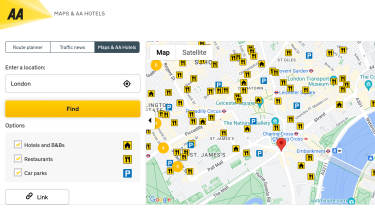
When you’ve arrived at your destination, you can use the ‘Maps and AA Hotels’ function to search for nearby AA-registered hotels, B&Bs and restaurants. You’ll need to contact these establishments directly if you wish to make a booking, though.
While the AA does also offer a journey planner on its main mobile app, this has slightly fewer tools than its online counterpart. You can still enter your starting location and destination as normal, but live navigation will be delegated to another app, such as Waze.
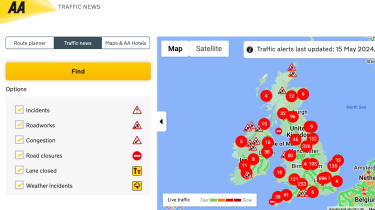
The AA mobile app also has a separate live traffic reporting tool, which displays live jam and roadwork locations.
Tell us what you love (and hate) about your car. Take the Driver Power survey now and you could win a £100 Amazon voucher...