MG infotainment review: iSmart touchscreen tech tested vs rivals
We find out if the MG3 combines high-tech with its low cost

| Pros | Cons |
|
|
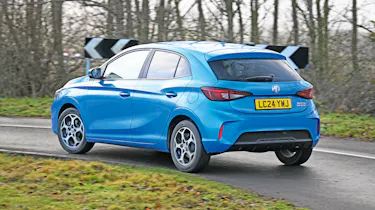
Straight away, we need to acknowledge that the MG3 is the cheapest car in this test by far. Prices start from only £18,495, yet every model has a 10.25-inch touchscreen that is surprisingly clear and responsive, when you consider the price tag. It’s also running MG’s latest iSmart software – the same operating system that you’ll find in the new MG HS and MG ZS, too.
The set-up is rather modest compared with some of the massive screens featured in the other cars here. But it gets the job done and is certainly a big improvement over the brand’s earlier efforts in this department. That said, you can always bypass the built-in software by using Apple CarPlay or Android Auto – so long as you remember the right cable, because neither is wireless on the MG3.
The homepage has four large tiles with limited but essential controls for the media, air-con, navigation and phone connectivity. On the right side are several shortcut buttons that help switch between the most important menus. These icons are quite small, and so are the toggle switches for certain driver-assistance systems. This can make them difficult to tap while on the go, which is on top of having to search through different settings menus to find the feature you want to turn off.
Still, the MG3 does have a small selection of physical shortcut buttons along the dashboard, including volume controls. Another opens the climate control menu – unless you’re using CarPlay, because if you are, pressing that button does absolutely nothing. This means that you have to return to the homepage before you can open the climate control menu, which is an unnecessarily convoluted process when you just want to turn down the air-conditioning while on the move.
You can programme the joystick pads on the right side of the steering wheel to adjust the cabin temperature and fan speed, but other functions such as fan direction or activating the heated steering wheel must be done via the touchscreen.
| Touchscreen task | Time | Ranking |
| Lane-keeping assistance task | 10.4 secs | 4th |
| Sat-nav task | 18.1 secs | 8th |
| Cabin temp. task | 5.3 secs | 8th |
| Heated seat task | 5.0 secs | 8th |
| Radio tuning task | 5.4 secs | 3rd |
| Distracted lap time | Over 27 secs | 5th |
Test team views
- Dean says: “The lane-keep assist is quite fiddly, because you’ve got to go into a menu. You have to scroll down to find it, and then have to deactivate it and confirm, too. So it’s a long, long, drag of the menu, and then two buttons presses. There’s a temperature control on the home screen, but if you touch the wrong spot it takes you to a general climate menu.”
- Shane says: “I think the MG actually has quite a good system, considering the car’s cost. The graphics aren’t the nicest in the world, but everything’s pretty easy to use, while response times are quick. You’ve got shortcuts to climate control, temperature control is pretty much instant, and the sat-nav will guide you home with just one touch. It’s not the slickest system, but is very acceptable.”
- Victoria says: “Every time you press a button, it goes, click, click, which is so annoying! Then when you turn off the lane-keep assist, you have to press and it asks ‘Are you sure?’. This is unnecessary, because you wouldn’t be there if you didn’t want to do it. The screen design and the overall user experience aren’t as nice as they could be, and the screen is too small.”
Display & navigation
- Destination: A relatively small screen meant the keyboard was tricky to use when on the move, although
the large places of interest keys could come in handy. - Settings: The sub-menus open to reveal longer lists of functions, but if you get lost, you can simply press the home screen in the top right of the display. The sub-menus open to reveal longer lists of functions, but if you get lost, you can simply press the home screen in the top right of the display.
- Home: The small on-screen buttons need a deliberate press, otherwise you’ll open a sub-menu. The row of physical climate and volume shortcuts below is handy.
What's the app like?
Don’t let the iSmart name fool you – the MG app is not the most intelligent car companion app out there, but it does offer some benefits. Being able to lock (and unlock) your car is handy if you’re worried that you had forgotten to do so, while you can also set the air-con temperature and turn on the heated seats.
The app itself was rather difficult to set up, though, locking us out after several attempts. You also can’t send sat-nav directions to the car – only to Google or Apple Maps on your phone. Plus it’s important to make sure you download the correct MG app, because we counted no less than four others on Apple’s app store. This particular MG app ranked in 10th place of those we tested.
Best car infotainment systems: head-to-head test
- Best car infotainment systems test intro
- Ford SYNC 4 review
- Genesis ccIC review
- Mercedes MBUX review
- MG iSmart review
- MINI Operating System 9 review
- Peugeot i-Cockpit review
- Renault OpenR Link review
- Skoda Navigation review
- Tesla UI review
- Volvo Android Automotive review
- Best car infotainment systems test results
Did you know you can sell your car through Auto Express? We’ll help you get a great price and find a great deal on a new car, too.