Volvo infotainment review: Android Automotive touchscreen tech tested vs rivals
Volvo uses Android tech in the EC40, but does this give it an edge?

| Pros | Cons |
|
|
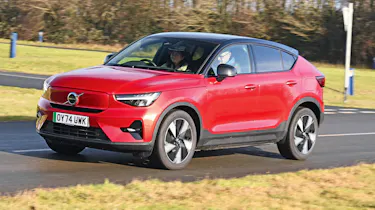
Volvo has followed the same route as Renault and incorporated Google’s Android Automotive operating system into its cars. It’s offered across the entire range, while sister brand Polestar uses the same set-up with its own fonts and graphics. However, despite the software behind the operating system being the same as the Renault Scenic’s in this test, the Volvo EC40’s is running on a nine-inch portrait touchscreen that was first introduced when the original XC40 arrived in 2017.
The C40 coupé-SUV joined the line-up in 2021 and both it and the XC40 were revised in 2023 when Android Automotive was introduced and the electric versions changed their names. But the dash layout remained unchanged, so as well as the screen being smaller than newer models here, there’s one physical button beneath the display and a row of basic shortcuts for the hazard-warning lights, front and rear window heaters, a large volume knob and audio controls, plus a drive-mode switch.
The portrait-orientated screen is close enough for the driver to use, and has the climate controls as a permanent fixture across the bottom of the display - they eat into the available space, but are relatively easy to use. The screen itself is sharp,and a swipe down from the top presents you with various app buttons, although because of the panel’s size, they’re a little on the small side.
Apple CarPlay and Android Auto are included, but these two systems are wired. If you have a Google account, then you can sign into the car directly to use the software giant’s built-in apps. These include Google Maps, which is just as quick, easy and reliable to use as the smartphone version, while Google Assistant voice recognition offers a wide range of functionality. You can integrate the car’s system with compatible devices (smart home thermostats, for example), while there’s four years’ worth of unlimited mobile data for you to use. We’ve found the system takes a little while to set up, but is seamless in operation once activated.
| Touchscreen task | Time | Ranking |
| Lane-keeping assistance task | 9.7 secs | 3rd |
| Sat-nav task | 14.0 secs | 5th |
| Cabin temp. task | 4.2 secs | 4th |
| Heated seat task | 3.2 secs | 6th |
| Radio tuning task | 5.7 secs | 5th |
| Distracted lap time | +12 secs | 1st |
Test team views
- Dean says: “I found this pretty simple to set up. You have to go into a sub-menu to turn the lane-keep assist off, but it’s just a case of finding the menu, pressing the button, and it’s deactivated. There’s a layer of complication on the heated seat, because there’s a heated steering wheel, too, which makes things trickier when driving. But generally it’s all good.”
- Shane says: “As you’d expect of a Volvo, everything’s quite logical as far as the layout goes. The sat-nav system is Google Maps – great when it’s working, but I thought it was very slow to load. The lane-keep assist is only one sub-menu and one switch away, while the climate control and heated seats are on buttons at the bottom of the screen, which are quite responsive.”
- Victoria says: “I definitely prefer the vertical screen, especially when it comes to the maps, because you can see more of where you’re going. I think that it makes for a better user experience. I found using the system was very straightforward, and the graphics and design help make it extremely simple to use. Everything’s well separated, too.’
Display and navigation
- Destination: Volvo’s screen is on the small side, so the keyboard is a bit cramped. Google’s live mapping is at the mercy of the signal available at your location.
- Settings: Simple sub-menus offer quick access to various options, although navigating them can be tricky thanks to the small on-screen buttons.
- Home: Solitary physical button below the screen gets you back to the main menu; sweeping down from the top brings up the app display.
What's the app like?
In typical Swedish fashion, Volvo’s car companion app is minimal in terms of design – and, sadly, functionality. On the positive side, however, there’s no getting lost in menus and we found it was easy to adjust charging settings, such as the maximum percentage.
But it was a bit of a pain to set up, requiring two keys to be present at the same time. Plus, despite Volvo models using Google software, we couldn’t find a way to send sat-nav directions to the car, and were only able to copy and paste directions to the Maps app on our phone. We rated it fifth overall.
Best car infotainment systems head-to-head test
- Best car infotainment systems test intro
- Ford SYNC 4 review
- Genesis ccIC review
- Mercedes MBUX review
- MG iSmart review
- MINI Operating System 9 review
- Peugeot i-Cockpit review
- Renault OpenR Link review
- Skoda Navigation review
- Tesla UI review
- Volvo Android Automotive review
- Best car infotainment systems test results
Did you know you can sell your car with Auto Express? Get the highest bid from our network of over 5,500 dealers and we'll do the rest. Click here to try Auto Express Sell My Car now...